
Your results live on the club's screen
You already have MyLaps or Speedhive timing. Pitboard turns it into a living leaderboard, on a screen in the clubhouse, updating with every pass under the loop. Drivers watch their spot move without taking their eyes off the track. No manual entry, no software to install.
A leaderboard that lives on its own
In many clubs, the screen shows the clock during a race, then goes dark. The rest of the week, it shows nothing, and the buzz fades with it.
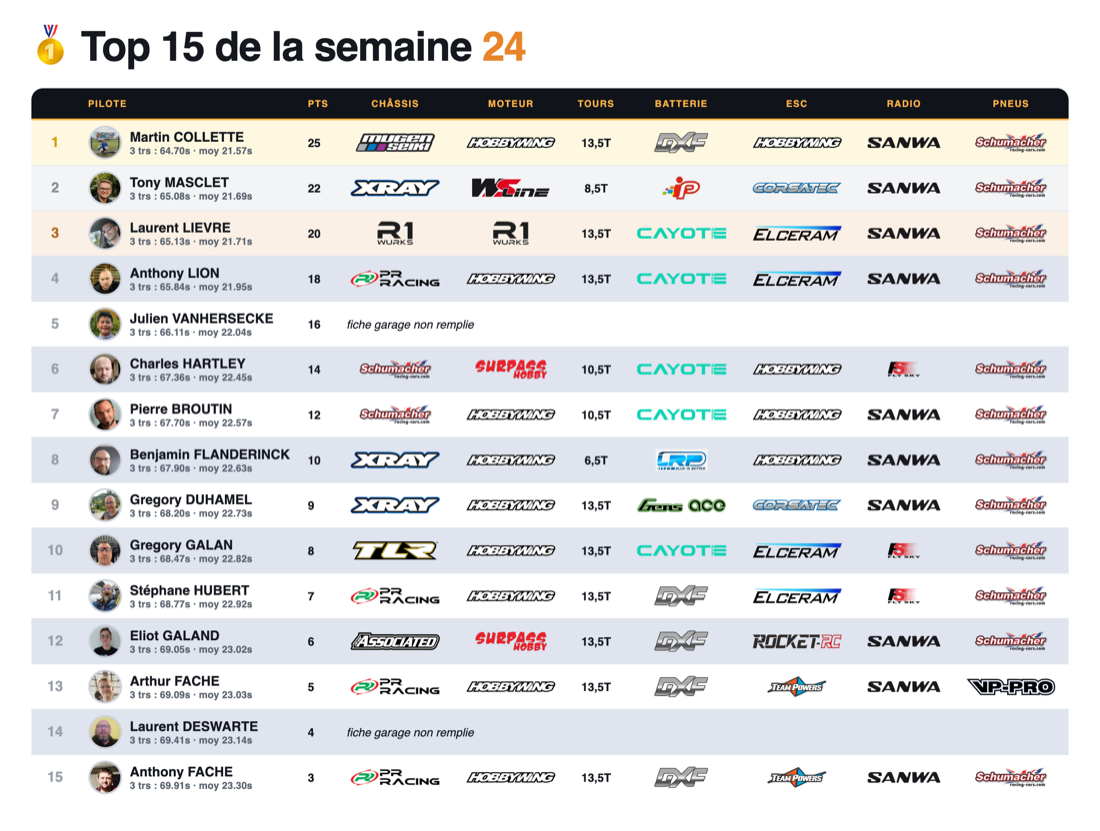
Pitboard's screen mode stays on. It constantly shows the weekly ranking, the track records and the season championship. With every run completed, the screen refreshes itself. Nobody touches anything.
Result: a driver pulling into the pits glances at the screen and sees if they've gained a spot. It instantly makes you want to head back out for one more lap.
What runs on the screen
Screen mode isn't just a list of times. It scrolls through what brings the club to life, big and readable from a distance, built to be seen from the track.
The weekly ranking
Who's leading this week, who just passed whom. The current standings, updated with every session, with championship-style points.
Records falling
The track's best lap, and the name of whoever holds it. When someone beats it, the screen shows it. It's the bar everyone wants to clear.
The season championship
Points added up week after week. The screen keeps the long game in mind: it's not just one run, it's a spot in the year's ranking.
Connected to your MyLaps or Speedhive timing
The screen doesn't invent anything: it shows what your timing system already measures. Pitboard connects to your MyLaps or Speedhive setup, reads every pass under the loop and updates the ranking. You don't change a thing about your setup.
Every car is identified by its MyLaps RC4 transponder. As soon as a driver runs with it, their times show up on screen, tied to their name. Nothing to declare, nothing to log by hand.
It's the same feed that powers the club's site, viewable from home. The screen in the clubhouse and the site tell the same story, in real time.
What you need, hardware-wise
Almost nothing. A screen or a TV, and something to open a web page on it. Many clubs plug an old PC or a small box into a TV near the track, open the page full screen, and let it run.
The display page is built for this: large text, high contrast, automatic refresh. No mouse to move, no menu to click. Open it once, and it takes care of the rest.
One more screen in the clubhouse, another trackside, a tablet at the pits: the same page shows everywhere, always up to date. Everyone sees the ranking from wherever they are.
Choose what the screen shows
Each club shows what it wants. The weekly ranking for the buzz. The info page for announcements. Records, the championship, or a single category that's running.
Nothing limits you to a single screen. Some clubs line up several, side by side. At RC Park, we went as far as six screens. Three on top, three below. Enough to show as much info as possible, continuously.
One practical tip: schedule the PC. Screens switch off at night, on their own. They switch back on in the morning, 9am to 8pm. You save without even thinking about it.
While it's running, and between runs
During a session, the screen keeps pace with the runs. A driver finishes their run, their best laps come through, and their spot recalculates in front of everyone. You see who's climbing, you see who's getting caught.
Between sessions, the screen doesn't switch off. It keeps showing the weekly ranking and the records. Tuesday evening as much as Sunday afternoon, it reminds everyone where they stand. The club stays alive even when the track is quiet.
That's the difference from a plain race display: that one stops at the end of the heat. Pitboard's board tells the story of the club's whole week.
All categories on the same screen
Do you run 1/8 off-road and 1/10 on-road on the same timing setup? The screen keeps rankings separate. Each scale, each category has its own, with no second decoder or second screen required.
On carpet, on asphalt, on dirt, the measurement stays the same: your laps, filtered of glitches. The screen can alternate between categories, or stay on the one currently running.
A driver never compares themselves to another scale. They see their spot among their real rivals, the ones running the same type of car.
Rankings at the club, and in your pocket
The clubhouse screen and the club website show the same thing, at the same time. Whatever appears on screen during a session, every driver can find again on their phone, from home, that same evening.
A driver leaves the club after their session, opens the site on the train or on the couch, and sees their spot, their best lap, their progress again. The screen's buzz continues once they're home. It's the same ranking, seen from two places, that extends the evening long after the cars are packed away.
A screen that makes you want to come back
Seeing your name climb on a screen, in front of your clubmates, changes everything. It's no longer a time jotted in a notebook, it's a spot everyone can see. You want to defend it, you want to reclaim it.
It's often that small screen trackside that turns a Tuesday practice into an appointment. You come to drive, but also to see where you stand, and leave thinking about a rematch next week.
To go further
Frequently asked questions
What hardware do you need for the screen?
A screen or a TV, and something to open a web page on it: an old PC, a small box or a tablet is enough. Open the display page full screen and let it run.
Does the screen update itself?
Yes. With every pass under the loop, the ranking recalculates and the screen refreshes automatically. Nobody needs to touch anything.
Do you need special timing equipment?
A MyLaps or Speedhive timing setup, and a MyLaps RC4 transponder on every car, just like the rest of Pitboard. The screen shows what your timing system already measures.
Can you display several categories?
Yes. Every scale and every category has its own ranking, even on a single decoder. The screen can alternate between categories or stay on the one that's running.
Does it replace the race clock on screen?
These are two different displays, and Pitboard does both. This page is about the everyday notice board: weekly ranking, records, championship. On race day, the same screens switch to the race results with Pitboard Live.
Want a screen like this at your club?
Watch screen mode live on a demo club, then create your own. We'll connect it to your timing system, no setup fees.